Day Counter. Count Up & Down
BITSENSEvents
4.2185.00 Reviews
- Version
- 1.43.0
- Installs
- 100.00K
- Age Rating
- Everyone
Screenshots
Our Review of Day Counter. Count Up & Down
 Analysis by Appyee
I like the idea of a day counter most when it solves a small, recurring annoyance: remembering how far away an event is, or how long I have kept a promise to myself. Day Counter. Count Up & Down is built around that simple job. It is an events app from BITSENS, and its appeal is the ability to keep future dates and elapsed-time milestones together rather than scattering them across notes and calendar entries.
A clear price, with one detail to keep in mind
The app is free to install, and it is rated for Everyone. There are in-app purchases priced from $2.99 to $19.99 per item, so the sensible way to approach it is to start with the free access and decide whether the app already does enough for your routine. I would not treat the purchase range as a reason to pay before trying the basic idea; first see whether a dedicated counter is actually more useful to you than the calendar you already have.
Its audience numbers suggest it has found a substantial group of users: it has over 100,000 installs and a 4.3 average from around 1,000 ratings. Those figures are context, not a guarantee that the app will suit every workflow. I would judge it by a practical test: can I set up the dates I care about quickly, and do I notice them at the right time?
Your Personal Countdown Buddy
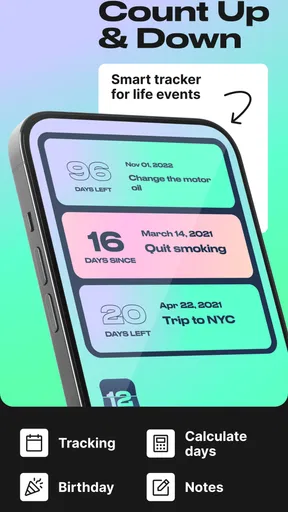
Right off the bat, Day Counter. Count Up & Down greets you with a clean and intuitive interface. Setting up your first countdown is as simple as pie. Whether you're counting down to a birthday, a wedding anniversary, or even the next big game, this app has your back. You just plug in the date, and voilà, your countdown is ready to roll.
One of the coolest features is the ability to customize each countdown. You can choose different themes and colors, making it not just functional but also visually pleasing. It feels like your countdown is a personalized little widget cheering you on or reminding you to get packing!
Counting Up to Success
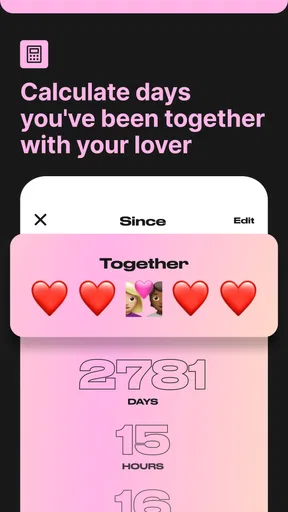
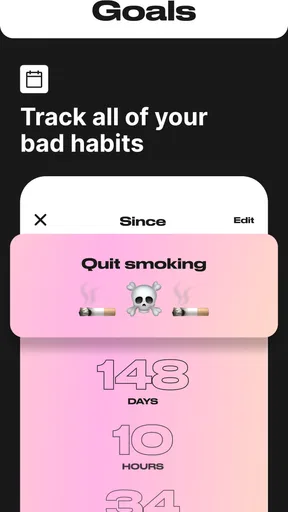
But wait, there's more! Not only does the app count down, but it also counts up. This is perfect for tracking how long you've stuck to a new workout regimen or how many days you've been caffeine-free. Every day you open the app and see those numbers climb is a little victory dance for your motivation.
Adding a count-up event is just as easy as setting a countdown. You enter the start date, and the app does the rest. Watching those days accumulate gives you a tangible sense of achievement, which is a fantastic boost to keep going.
Features and Ease of Use
One thing I love about Day Counter. Count Up & Down is its simplicity. The app doesn't bombard you with ads or unnecessary features. It's streamlined and straightforward, doing exactly what it promises without any fluff. This makes it incredibly user-friendly, even if you aren't the most tech-savvy person out there.
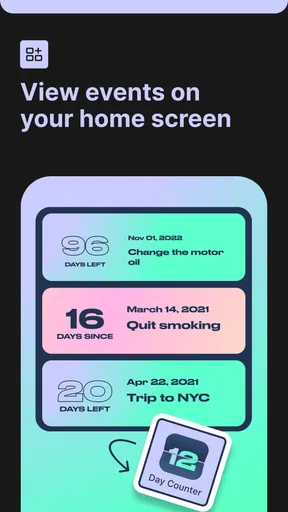
The app also includes a handy widget for your home screen, so you can keep an eye on your most important events without even opening the app. Just a quick glance at your phone, and you're reminded of what's coming up or how far you've come.
Where a counter earns its place
In my routine, the strongest use case is a date that needs attention but does not belong on a busy calendar as a meeting. Imagine planning a weekend away: I can keep the departure date visible as a countdown, while a count-up marks how long it has been since I began a savings habit for the trip. Those two counters answer different questions at a glance—what is approaching, and what progress has already accumulated—without turning either into a task list.
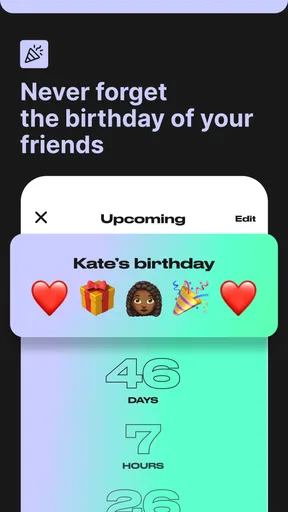
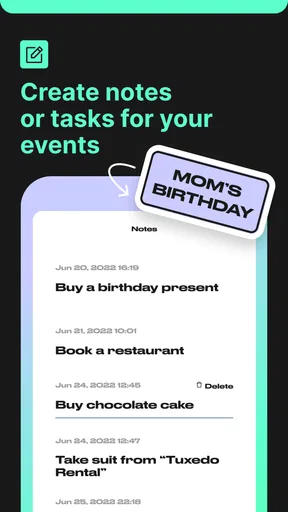
For birthdays, the benefit is less about replacing a calendar reminder and more about keeping the occasion in view before the day arrives. A calendar alert is better for a precise notification; a counter is better for the gradual sense of “it’s getting close.” I would use both for an important event rather than assume that seeing a number is the same as receiving a reminder.
There is also a useful distinction between a habit counter and a habit tracker. A count-up can show the length of a streak or time since a starting point, which may be encouraging, but it does not by itself record the quality of each day, skipped sessions, or why a routine changed. If I need check-ins, notes, flexible schedules, or detailed progress history, I would choose a dedicated habit tracker and keep this app for the simple elapsed-day view.
Small choices that make the list more useful
I would give each counter a label that still makes sense months later. “Start” is easy to understand today, but “Started morning walks” gives future me context when the count has grown. For recurring life events, I would also decide whether I care about the next occurrence or the original date; a birthday countdown is about the next celebration, while an anniversary count-up is usually about time since one fixed beginning. Keeping those purposes separate helps avoid reading the wrong number as progress.
With several counters, visual customization can do more than make the screen attractive. I would reserve one color or theme for near-term commitments and another for long-running milestones, so a quick glance has meaning before I read every label. This is a personal organizing trick rather than a special automated system, but it makes a set of counters easier to scan and reduces the chance that a fun event gets buried among routine markers.
The home-screen widget is most helpful when I choose only the events I genuinely want to see often. Putting every birthday, goal, and personal milestone in the most visible spot can turn a motivating glance into clutter. I would start with one upcoming date and one count-up, then adjust after using them for a few days. The right selection depends on whether seeing a counter prompts a useful action or merely adds another number to check.
How it compares with calendars and other trackers
A standard calendar remains the better tool for appointments, schedules, and events that need a time, location, or coordination with other people. A calendar lays out the day and helps prevent clashes; a day counter gives a single date or elapsed period more prominence. I see them as complements, not rivals. For a dentist appointment, I would rely on a calendar. For a personal countdown to a move or a long-running milestone, a dedicated counter is easier to keep in view.
Notes apps are more flexible because they can hold context, plans, and checklists alongside a date, but they usually require me to open the note and interpret it. A counter is quicker when the only question is “how many days?” That convenience has a boundary: if an event needs packing lists, shared decisions, or a sequence of tasks, a note or planning app is the more complete home for it. I would not try to make a number display do the work of a project plan.
Compared with a full habit app, the count-up approach is deliberately narrower. It can make a streak feel concrete, but it is not a substitute for recording repeated actions or reviewing patterns. That trade-off is a strength for someone who wants a low-effort marker and a weakness for someone who wants coaching or detailed accountability. Before moving a habit into a counter, I would ask whether simply seeing elapsed days will help me continue; if I need to understand why I miss days, I need a richer tracker.
Where the simplicity can fall short
The same minimal approach that makes setup approachable also means I would not expect a counter to manage an entire event. Seeing a wedding date approach can be satisfying, but it does not organize invitations, payments, or a schedule. I would pair the countdown with a calendar and a planning list when the event involves several moving parts. The counter is a reminder of the horizon, not a replacement for the work needed to reach it.
Count-ups can also be emotionally mixed. A rising number can encourage me after a positive change, but it may feel unhelpful when tracking a difficult period or a goal that has not gone smoothly. In that situation, I would remove or rename the counter instead of letting the number become a daily judgment. A tool that is meant to support motivation should be allowed to change as the goal changes.
Before relying on any home-screen display, I would check that the chosen counter is still the one I want in front of me and that its label is clear. Widgets are convenient precisely because they reduce steps, but that also means an outdated or poorly named item can keep presenting the wrong context. A quick review of the counters from time to time is a small habit that keeps the display useful.
Who is most likely to get value
I would recommend it to someone who enjoys seeing time made visible: people looking forward to a trip, keeping a personal anniversary, or marking the start of a routine without needing a detailed tracker. It is especially appealing if the act of opening a complicated planner feels like too much for a simple question. A lightweight counter can make a date feel present without asking me to build a whole system around it.
I would be more cautious if you need shared calendars, robust reminders, detailed habit logs, or event planning in one place. Those needs call for tools designed around collaboration or record-keeping. Likewise, if seeing a running count creates pressure rather than encouragement, there is no reason to keep one just because the feature exists. The useful choice is the one that makes your day clearer, not the one with the most visible metrics.
Day Counter. Count Up & Down is currently at version 1.38.0 and requires Android 7.0 or later. It has been available since April 11, 2020, and its 126 written reviews add another layer of user feedback beyond the ratings. I treat that as helpful background, while still focusing on whether its straightforward counting style matches the way I remember dates and track personal milestones.
My practical verdict
So why should you download Day Counter. Count Up & Down? Well, if you're like me and have a million things to keep track of, this app is a lifesaver. It's versatile, whether you're getting excited for something in the future or proud of a past achievement. Plus, the customization options mean you can tailor it to fit your style, making it not just a tool but a part of your daily routine.
In conclusion, if you're looking for a simple, effective, and visually appealing way to keep track of important dates and milestones, give Day Counter. Count Up & Down a try. It's like having a personal cheerleader on your phone, always ready to remind you of the exciting things ahead or the progress you've made. What’s not to love?
Privacy and Permissions
See what permissions an app requests and how it handles your data.
- Other
- view network connections, full network access, run at startup, control vibration, prevent device from sleeping, read Google service configuration
Verdict
Strengths of Day Counter. Count Up & Down
- Simple and intuitive user interface.
- Customizable event reminders.
- Supports multiple event tracking.
- Syncs across multiple devices.
- Lightweight and fast performance.
Limitations of Day Counter. Count Up & Down
- Limited free version features.
- Ads in the free version.
- No offline mode available.
- Requires account for cloud sync.
- Limited theme customization.
Similar Picks in This Category
View All
Easy Quran Mp3 Audio Offline
Muslim Worldapp4.7

Invitation Maker: Cards & RSVP
Greetings Island4.9

StubHub - Live Event Tickets
StubHub4.3

Fever: Events & Tickets
Fever Labs4.7

Epic Freebie Games Radar
Arioch Pds - Apps & Games4.4

Invitation card Maker, Design
Splendid App Maker4.9
Frequently Asked Questions
What is the Day Counter app used for?
Day Counter is a versatile app designed to help users track important dates and events. Whether you're counting down to a significant event like a wedding or tracking the days since a milestone, the app offers both count-up and countdown features to keep you organized and on schedule.
How user-friendly is the Day Counter app?
The Day Counter app boasts an intuitive interface, making it accessible for all users. With easy-to-navigate menus and straightforward setup, you can quickly add new events, customize reminders, and view your countdowns or count-ups with minimal effort, ensuring a seamless experience.
Can I customize notifications in the Day Counter app?
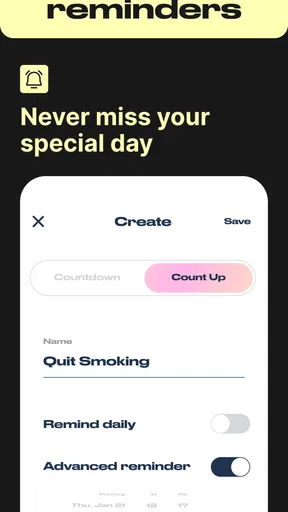
Yes, the Day Counter app allows for comprehensive customization of notifications. You can set reminders for specific events, choose how frequently you'd like to be notified, and even customize alert tones. This ensures you never miss an important date or event, keeping you informed and prepared.
Does the Day Counter app support widgets?
Indeed, the Day Counter app supports widgets, allowing you to view your most important countdowns or count-ups directly from your home screen. This feature provides quick access without having to open the app, making it easier to stay updated on upcoming events.
Is the Day Counter app available on both Android and iOS?
Yes, the Day Counter app is available for both Android and iOS platforms. This cross-platform availability ensures that you can enjoy its features regardless of your device, providing a consistent experience whether you're using a smartphone or tablet.
